End of an Era Bundle includes 2 types of preset files- XMP and LRT. The LRT files are included for users with older of versions of Lightroom. They do not import on mobile. You will receive an error if you attempt to import both files types on desktop.
Before you get started, download the two files named LLP-BF-Bundle2025-a.zip and LLP-BF-Bundle2025-C-Bonus.zip. These are the only files that contain presets for Lightroom Mobile.
Once they’re downloaded, unzip both files. Inside each one, you’ll find a folder containing the individual preset collection ZIP files. Only unzip the main download—you do not need to unzip each individual preset collection.
Next, open the Lightroom Mobile app and select any photo to edit.
At the bottom of the editing screen, tap the Presets icon. Then tap the three dots in the top corner and choose Import Presets.
Navigate to the folder you unzipped, open it, and select one of the individual preset collection ZIP files. Tap Import, and Lightroom will add that collection. Repeat this process for each preset collection you’d like to import.
Seeing Errors?
As stated above, there are two types of files included in this bundle and you DO NOT NEED BOTH. You are most likely importing the XMP files. You’ll find those in LLP-BF-Bundle2025-a.zip and LLP-BF-Bundle2025-C-Bonus.zip, you can ignore LLP-BF-Bundle2025-b-zip.
Zip A contains XMP format of presets.
Zip B contains the LRT format of all the collections in A for those that have older versions of Lightroom.
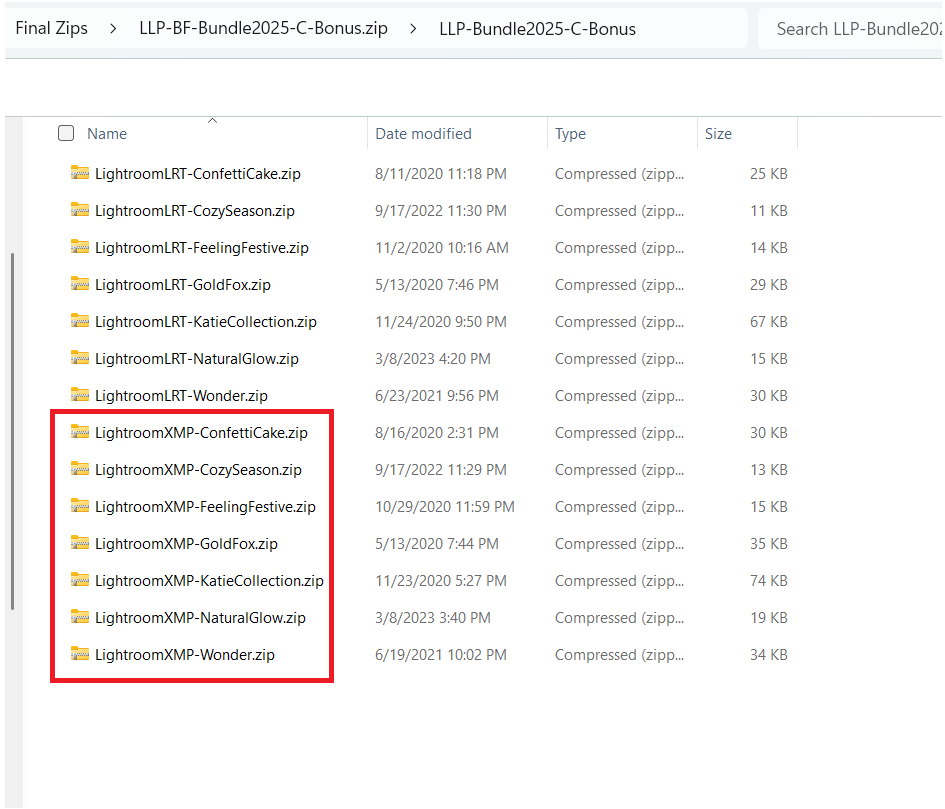
Zip C contains both LRT and XMP. You’re going to want the XMP files. In my screenshot below, you’ll only want to import the ones in the red box.